Your team is already using AI.
Maybe it started with harmless things:
- Summarizing meeting notes
- Cleaning up emails
- Drafting proposals
Then someone pasted a client spreadsheet into ChatGPT.
Someone else uploaded a contract into Copilot.
An analyst dropped financial projections into Gemini.
Productivity shot up.
But here’s the question no one slows down to ask:
What actually happens to your business data once it enters an AI tool?
If you’re an accounting firm, legal practice, healthcare administrator, or PE-backed growth company, this isn’t theoretical. This is governance. This is compliance. This is cyber insurance renewal.
Let’s break it down clearly.
What Happens Technically When You Paste Data Into an AI Tool?
At a high level, four things typically happen:
- The data is transmitted to the AI provider’s cloud infrastructure.
- The system processes it to generate a response.
- The interaction may be logged for monitoring or service improvement.
- Depending on account type and settings, it may or may not be retained or used for model improvement.
Major vendors like OpenAI, Microsoft, and Google publish documentation explaining how enterprise and API data is handled. Those policies differ by plan and configuration.
The nuance matters.
Consumer accounts are not the same as enterprise agreements. Browser sessions are not the same as controlled API deployments. Opt-in settings change retention behavior.
Here’s the uncomfortable part:
If your team is using AI through unmanaged browsers on unmanaged devices, you probably don’t know which rules apply.
And regulators won’t accept “we weren’t sure.”
Is My Business Data Being Stored or Used to Train AI Models?
The honest answer: it depends.
It depends on:
- Whether you are on a consumer or enterprise tier
- Whether training opt-outs are enabled
- Whether data is submitted through API or web interface
- What contractual terms you signed
- How long logs are retained
For compliance-driven professional firms, that level of ambiguity creates risk.
If you handle:
- Tax returns
- Client financials
- Legal drafts
- Healthcare administrative data
- Personally identifiable information
Then AI data security for SMB is no longer a curiosity. It becomes a board-level question.
Because the issue is not whether AI vendors are malicious.
The issue is accountability.
When something goes wrong, who owns the outcome?
Why Is AI Adoption a Bigger Compliance Issue Than It Looks?
AI expands your data surface area quietly.
Think about how most teams use it:
- Copy from accounting software
- Paste into AI
- Copy results
- Download to local machine
- Email externally
Now multiply that across 40 employees.
That is shadow data movement.
For firms facing audits or cyber insurance underwriting, this creates three immediate problems:
1. Evidence Gaps
Can you document:
- Where data traveled?
- Who accessed it?
- How long it was retained?
2. Endpoint Risk
If AI access happens from personal laptops, home Wi-Fi, or unmanaged devices, your security perimeter dissolves.
VPN does not solve this.
VPN protects the tunnel. It does not control what happens after the data leaves it.
3. Vendor Escalation Confusion
If there’s a data exposure incident, who responds?
- Your MSP?
- The AI vendor?
- Your cloud provider?
- Your cyber insurer?
Vendor sprawl turns into escalation chaos fast.
How Does This Affect Cyber Insurance and Underwriting?
Underwriters increasingly ask about:
- Access control enforcement
- Logging and monitoring
- Data retention policies
- Backup and recovery discipline
- Endpoint management
If AI usage is decentralized and undocumented, you’ve introduced a variable into your risk profile.
For PE-backed growth companies and compliance-sensitive SMBs, unpredictable risk equals unpredictable cost.
Predictable IT infrastructure costs require predictable control.
Is DIY AI Adoption the Same as a Managed AI Environment?
Let’s compare the models directly.
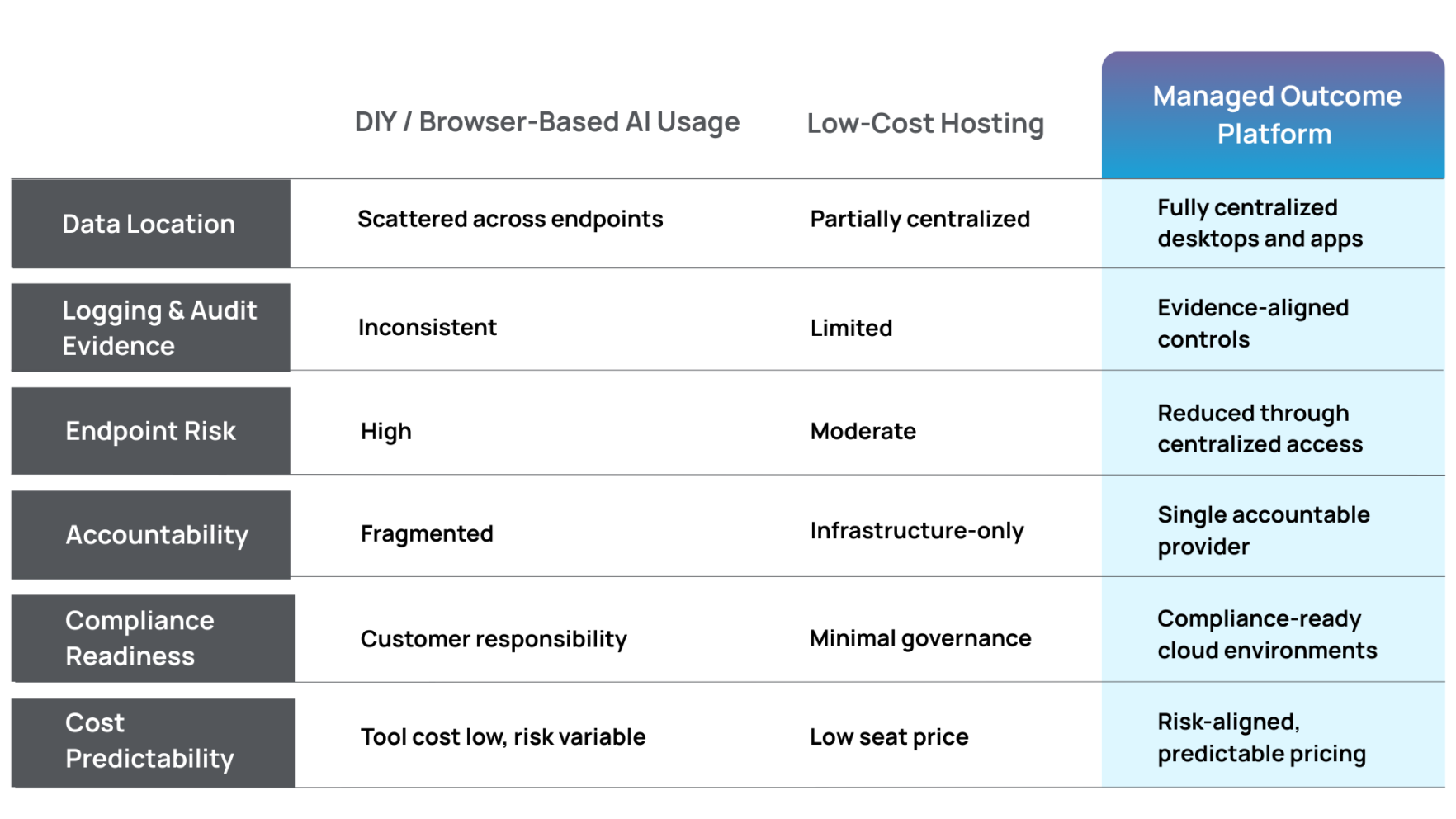
Here’s the pattern:
Tools are cheap. Ownership is expensive.
Managed cloud platforms for SMB environments convert hidden operational risk into defined accountability.
That difference only becomes obvious after something breaks.
Why Does Centralization Matter for AI Data Security?
If your AI usage runs inside a virtual desktop for compliance, the rules change.
In a centralized, managed environment:
- Business data does not live on personal devices
- Role-based access is enforced
- Logging is centralized
- File transfer rules can be controlled
- Session activity is visible
- Backup and recovery are structured
This is how secure remote work without VPN sprawl actually works.
AI becomes a productivity layer inside a governed infrastructure, not an uncontrolled browser shortcut.
That distinction is everything.
What About Legacy and Vertical Applications?
Many SMBs rely on:
- Tax software
- Case management platforms
- Industry-specific Windows applications
- Healthcare administrative systems
These applications were never designed with AI in mind.
So teams export data.
Exports become local files.
Local files become AI prompts.
AI outputs get redistributed.
In application-first hosting environments, data stays centralized. Exports can be restricted. Performance remains consistent. The blast radius shrinks.
If your business depends on one or two mission-critical applications, you cannot afford governance drift.
Are We Overreacting About AI Risk?
AI risk deserves serious attention, and the smartest approach is disciplined governance rather than emotional reaction.
AI adoption is inevitable. It is also manageable.
Treating AI like just another SaaS subscription oversimplifies its impact on data governance and infrastructure control.
It touches your most sensitive information.
If your firm cannot tolerate:
- Audit failure
- Revenue loss from downtime
- Insurance renewal friction
- Reputational damage
Then AI governance belongs inside your infrastructure strategy, not outside it.
What Should SMB Leaders Do Right Now?
Start with five blunt questions:
- Where does our business data physically reside during AI use?
- Are we using enterprise-tier agreements with clear data policies?
- Is AI access centralized or endpoint-driven?
- Can we generate audit evidence if asked tomorrow?
- Who owns the outcome if something breaks?
If those answers feel fuzzy, you have work to do.
The goal is to enable innovation while aligning AI adoption with compliance-ready cloud environments and accountable infrastructure.
Final Thought: AI Is Powerful. So Is Drift.
AI will absolutely improve productivity across accounting firms, legal practices, healthcare administration teams, and distributed SMB workforces.
But productivity without governance creates drift.
Drift creates exposure.
Exposure becomes cost.
The businesses that win over the next five years will be those that pair AI adoption with disciplined control.
- Centralized environments.
- Enforced security.
- Documented accountability.
- Predictable economics.
AI should accelerate your operations in a way that strengthens governance rather than introducing audit exposure.
The Job Site Connectivity Problem
Construction does not happen behind a desk. It occurs on job sites, in trailers, and across remote locations where decisions need to be made in real time. Yet for many construction companies, Sage 100 Contractor is still locked to an office server, accessible only through a VPN that was never designed for modern field operations.
Picture a project manager on a construction site trying to approve a purchase order or review a job cost report. They connect through a VPN over a spotty internet connection. The screen freezes. The session times out. Sometimes Sage crashes entirely. Work stops, not because the team lacks information, but because the system cannot deliver it reliably.
This problem is not user error or poor hardware. It is architectural. Sage 100 Contractor is a database-heavy desktop application. It was built to run with the application and database sitting close together on a local network. When you stretch that relationship across long distances and unstable connections, performance and reliability break down.
Private cloud hosting changes that model. Instead of dragging data back and forth over a VPN, Sage runs in a secure data center where the application and database live together. Field teams connect remotely to a high-performance environment designed for speed and stability. Hosting becomes an operational infrastructure that connects the field and the office without sacrificing performance.
Why VPNs Fail for Construction Accounting Software
Latency and Data Traffic
Sage 100 Contractor relies on constant communication between the application and its database. Every report, screen refresh, and job costing lookup triggers thousands of small data requests.
Over a VPN, those requests travel from the job site to the office server and back again. Distance, latency, and packet loss compound the problem. Even a strong internet connection can feel slow when every action depends on long-haul data traffic.
In a hosted environment, Sage and its database sit side by side in the same secure data center. Remote users are not pulling raw data across the internet. They are interacting with a live session that stays close to the data, delivering consistent performance regardless of location.
Data Corruption Risk
Dropped connections are standard on construction sites. Cellular networks fluctuate. Wi-Fi in trailers is inconsistent. When a VPN session disconnects mid-transaction, Sage data files can become corrupted.
Repairing that damage often requires downtime and specialist intervention. In some cases, firms lose hours or days of productivity while data integrity is restored. Hosting reduces this risk by keeping all database operations inside the data center, even if a user’s internet connection briefly drops.
Performance Impact on the Office
VPN users do not just slow themselves down. They consume bandwidth and server resources from the main office. As more project managers connect remotely, office staff experience slower performance for payroll, job costing, and reporting.
Cloud hosting isolates workloads in a centralized environment that scales. Remote access no longer competes with office productivity, and everyone works at full speed.
Real-Time Access: Connecting the Field to the Office
Project Management Without Delays
Hosted Sage 100 Contractor provides project managers with instant access to live field data. Invoices and change orders can be approved on-site. Budget-to-actuals can be reviewed in real time. Decisions happen when they matter, not after someone returns to the office.
This level of access improves project progress and reduces budget overruns caused by delayed approvals and outdated information.
Estimating and Preconstruction From Anywhere
Estimating databases is extensive and resource-intensive. Running them over a VPN often requires powerful laptops that still struggle with performance. With cloud hosting, the processing power lives in the data center, not in the truck.
Estimators and preconstruction teams can access complete databases remotely without investing in high-end hardware. Performance stays consistent whether they are in the office or on a construction site.
Bring Your Own Device Access
Modern construction teams are mobile. Hosting supports secure access from personal laptops and approved tablets. Permissions can be limited to only the modules and jobs each user needs, reducing risk while improving flexibility.
This model works well for subcontractors, temporary staff, and project-based access without exposing sensitive financial data.
Security: Protecting Bid Data and Financials
Ransomware Protection
Construction firms are frequent ransomware targets because of their time-sensitive operations and valuable financial data. A single attack can halt construction activities across multiple projects.
Hosted environments include immutable and isolated backups that prevent crypto-locker damage. Even if a workstation is compromised, core Sage data remains protected and recoverable.
Access Control and Data Security
Role-based permissions allow firms to control who sees what. Project managers can access job data and project details without visibility into payroll or banking information. This separation improves data security while supporting operational needs.
Cloud security measures extend beyond basic antivirus. They include monitored firewalls, intrusion detection, and controlled access to protect critical information.
Disaster Recovery and Business Continuity
Job trailers burn down. Laptops are stolen. Offices flood. When data is centralized, physical incidents at a construction site do not affect the business.
Disaster recovery planning ensures business continuity regardless of what happens on-site. Construction companies stay operational even when physical infrastructure is compromised.
Summit vs Sage Drive Remote Data Access
Understanding the Core Difference
Sage Drive is a synchronization tool designed for limited users and specific workflows. It relies on syncing data files between locations, which introduces delays and potential conflicts.
Hosted environments are full multi-user servers. Everyone works in the same live system at the same time. There are no sync cycles and no waiting for files to update.
Performance and Reliability
Cloud hosting delivers faster report generation and smoother file access. Because the system runs continuously in a centralized environment, users experience consistent performance.
File conflicts and sync failures are eliminated. Every user works from a single platform with a predictable experience.
Built for Construction Teams
Summit is designed as an enterprise-grade infrastructure for construction operations. It supports the way construction professionals actually work, across job sites, offices, and remote locations, without forcing compromises.
What to Look for in a Sage Construction Hosting Provider
Experience With Sage Products
Not all Sage products are the same. Providers must understand the differences between Sage 100 Contractor and Sage 300 CRE, as well as legacy names such as Master Builder and Timberline.
Experience matters when it comes to configuration, performance tuning, and troubleshooting.
Third-Party Integrations
Construction firms rely on more than accounting software. A qualified provider supports Procore connectors and add-ons, such as TimberScan and document management tools.
Hosting must accommodate the whole construction process, not just the ERP system.
Support Availability
Construction starts early. Support should align with construction hours and be available when job site teams are active. US-based support with real engineers, not scripted call centers, makes a measurable difference.
Ongoing support ensures the environment stays optimized as business needs evolve.
FAQ: Hosting Sage for Construction
Can I print checks or reports locally from the cloud?
Yes. Hosted environments support secure local printing and report output to your devices.
Does Sage hosting work on Macs or iPads?
Yes. Remote access allows Sage to be used on Macs and approved tablets without installing the software locally.
How long does migration typically take?
Most migrations are completed in days, not weeks, depending on data size and the number of integrations.
Can we host both Sage 100 Contractor and Sage 300 CRE?
Yes. Many construction companies run multiple Sage systems in the same hosted environment.
Build Better With Cloud Hosting
Construction moves fast. Infrastructure must keep up. When Sage 100 Contractor is tied to an office server and accessed through VPNs, productivity suffers and risk increases.
Cloud hosting removes friction. It delivers instant access, stronger security, and proper business continuity. Project managers stay connected. Construction teams make informed decisions. Operations scale without technical bottlenecks.
Schedule a demo to see Sage 100 Contractor running at full speed in the cloud with Summit, and build with confidence.
Introduction: The Sticker Shock Is Real
If you have recently priced a new server refresh, the shock is impossible to ignore. The server replacement cost in 2026 conversations we are having with CIOs, CFOs, and IT leaders all sound the same. Quotes are materially higher than the last refresh cycle, lead times are longer, and the financial justification is harder to defend.
Many organizations are seeing server cost increases that do not align with business growth or workload changes. Even modest refreshes that once felt routine now raise uncomfortable questions at the executive table. For many organizations, this is not about a single new server, it is about whether the entire buy and depreciate model still makes sense.
The drivers are structural, not temporary. Global AI infrastructure demand is placing sustained pressure on chip supply, which flows downstream into the SMB market. Even if your entire business is not running AI workloads, you are competing for the same components, supply chains, and manufacturing capacity.
The real issue is not just cost. The issue is that the traditional capex buy cycle is increasingly misaligned with how modern businesses operate.
This article is designed to help you evaluate CapEx vs. cloud decisions through a financial and operational lens, before you commit capital that may be better preserved for growth.
The Hidden Costs of On-Premise Servers Beyond the Hardware
Most server quotes focus on the hardware line item. That is only the beginning. When you zoom out, on-premises infrastructure incurs ongoing costs that rarely surface in initial budgeting discussions.
Energy and Cooling
Electricity rates continue to rise across many regions. Even a small on-premises data center or server closet requires constant power and active cooling to keep systems running smoothly.
Power costs extend beyond the server itself:
- Cooling systems running 24/7
- Power redundancy requirements
- UPS maintenance and battery replacements
- Environmental monitoring equipment
These are recurring operational expenses that grow quietly year over year.
Ongoing IT and MSP Costs
Servers do not manage themselves. Whether you rely on internal staff or a managed service provider, there are continuous maintenance costs tied to on-premises systems.
Typical line items include:
- Monthly patching and updates
- Monitoring and alerting
- Backup management and testing
- Emergency response and after-hours support
These expenses appear as opex, even though the server itself is on the balance sheet as a fixed asset.
Security and Compliance Add-Ons
Security is no longer optional. On-premises environments require layered protection that adds cost and complexity.
Common additions include:
- Endpoint protection licenses
- Backup and recovery tooling
- Ransomware protection
- Audit and compliance reporting
For regulated industries and financial institutions, compliance overhead introduces additional cost allocation issues that grow over time.
CapEx vs OpEx Cloud in 2026: How CFOs Are Reframing Infrastructure
The conversation has shifted. CFOs are no longer debating servers versus cloud in abstract terms. They are evaluating capex and opex strategies through cash flow, tax treatment, and risk exposure.
The CapEx Model
Traditional infrastructure follows a familiar pattern:
- Large up-front payment
- Capitalized as fixed assets
- Depreciated over time
- Support and maintenance costs increase as hardware ages
The problem is that hardware value declines while operational burden increases. Performance degrades relative to modern workloads, even though the asset remains on the balance sheet.
This model ties up capital in capex investments that deliver diminishing returns.
The OpEx Cloud Model
Cloud infrastructure flips that equation.
With an opex model, infrastructure becomes:
- A predictable monthly operating expense
- Fully deductible as incurred
- Free from capital lockup
- Continuously refreshed by the cloud provider
Instead of owning depreciating assets, businesses pay for usable capacity as part of regular operating expenses.
The Opportunity Cost Angle
Capital preserved is capital that can be redeployed. Many organizations are choosing opex purchases to improve cash flow and maintain flexibility.
That capital can be allocated toward:
- Product development
- Hiring
- Market expansion
- Revenue-generating initiatives
In 2026, this flexibility is becoming more valuable than ownership.
Why 2026 Is a High-Risk Year to Buy Servers
This is not a fear-based argument. It is a risk-based one.
Supply Chain Volatility
Hardware lead times remain unpredictable. Even standard configurations can face delays, limited customization, or last-minute substitutions.
These delays impact:
- Deployment timelines
- Disaster recovery planning
- Business continuity expectations
For most organizations, infrastructure delays introduce operational risk that is difficult to quantify but very real.
Accelerated Obsolescence
Software and security requirements are advancing faster than traditional hardware refresh cycles.
Common challenges include:
- Operating system requirements outpacing hardware capabilities
- Security standards require features not available on older platforms
- Increased demand for more storage space and scalable compute
The result is a growing mismatch between purchased infrastructure and future workloads.
At Summit, infrastructure refresh happens continuously. Clients avoid end-of-life deadlines, forced upgrades, and rushed purchasing decisions.
5-Year Total Cost of Ownership Comparison
This is where clarity emerges. A true total cost comparison looks beyond sticker price.
Scenario A: On-Premise Purchase
Over five years, costs typically include:
- Server hardware and replacement parts
- OS and access software licenses
- Power, cooling, and supporting infrastructure
- Backup, security, and data storage
- MSP or internal IT labor
- Disaster recovery investments
These costs hit both the balance sheet and the profit and loss statement, often unevenly.
Scenario B: Summit Private Cloud
With a private cloud approach, costs are consolidated:
- Monthly hosting
- Included monitoring and support
- Included backups and security
- Predictable cloud costs
- Simplified accounting treatment
There is no depreciation schedule, no surprise refresh cycle, and no stranded capex assets.
The key takeaway is not that cloud is always cheaper. It is that cloud delivers predictability, risk reduction, and cost control that on-premises infrastructure struggles to match.
When Buying Still Makes Sense
Buying infrastructure is not always wrong. In some cases, it can still make sense.
Examples include:
- Isolated workloads with no remote access requirements
- Highly specialized hardware use cases
- Environments with unreliable connectivity
That said, for small business, professional services, distributed teams, and regulated industries, the capex model often introduces unnecessary risk with limited upside.
The Summit No-CapEx Transition Approach
Moving away from aging infrastructure does not need to be disruptive.
Summit focuses on: If you’d like to learn more or get in touch, contact our team.
- Guided migration with minimal downtime
- Secure data transfer and validation
- Ongoing support from real engineers
- Responsible decommissioning guidance for legacy hardware
The goal is not just to move workloads, it is to help organizations exit outdated infrastructure responsibly and confidently.
FAQ: Server Replacement and Cloud Costs
Is cloud hosting actually cheaper than buying a server?
Not always on paper, but often more cost-effective when you factor in risk, predictability, and hidden expenses.
How does capex vs opex cloud impact taxes?
Cloud services are typically treated as operational expenditures, reducing complexity and improving flexibility compared to depreciated assets.
What happens to my data if I leave?
Your data remains yours. Clear exit paths and data ownership are core principles.
How long does migration take?
Timelines vary, but most migrations are measured in weeks, not months.
Stop Buying Depreciating Infrastructure
Infrastructure should support growth, not consume capital. The server replacement cost in 2026 is forcing a long-overdue reevaluation of how businesses invest in technology.
For many organizations, the question is no longer whether the cloud makes sense. It is whether continuing to buy depreciating infrastructure does.
Before committing to another refresh cycle, model your real costs. Compare risk, flexibility, and long-term impact, not just the initial quote.
If you want help running those numbers, Summit offers a guided TCO consultation designed to give you clarity before you commit capital that could be working harder elsewhere.