The accounting industry still runs on legacy tax software.
Across CPA firms, tax practices, and finance departments, critical platforms like Sage 100, Sage 300, Lacerte Tax, Drake Tax, UltraTax CS, CCH ProSystem and ATX continue to power daily operations.
Many firms exploring accounting software cloud hosting quickly discover that these platforms were originally designed for Windows servers and office networks—not browser-based SaaS environments.
That doesn’t mean they’re disappearing. In fact, they remain the backbone of how accounting firms prepare returns, manage financial data, and serve clients. For many firms, the real goal isn’t replacing these systems—it’s running them in a way that supports modern infrastructure, remote teams, and growing compliance expectations.
Why Do Accounting Firms Still Depend on Legacy Tax Software?
The short answer: these systems solve real operational problems.
Tax preparation and financial management involve complex calculations, regulatory requirements, and historical data dependencies. Many established platforms have spent decades refining those capabilities.
For firms running high volumes of returns or managing large client portfolios, the reliability of those workflows matters more than whether the software feels modern.
Legacy platforms typically offer:
- Mature tax calculation engines
- Deep regulatory compliance support
- Extensive reporting and audit capabilities
- Integration with accounting and document systems
- Large ecosystems of trained professionals and consultants
In other words, they reflect the practical realities of accounting work.
Replacing them entirely often requires far more disruption than most firms are willing to absorb—especially in an industry where deadlines, accuracy, and repeatable workflows matter more than novelty.
Another factor rarely discussed in technology conversations is the operational risk that comes with changing tools during high-stakes work. Accounting firms spend years building internal processes around specific tax platforms. Staff learn the shortcuts, workflows, and quirks of the software. During tax season, that familiarity becomes a real advantage. Switching platforms means retraining teams, redesigning processes, and accepting a temporary drop in productivity while people adjust. For firms operating under tight deadlines and regulatory scrutiny, maintaining familiar systems is about protecting productivity, accuracy, and hard-earned institutional knowledge.
Why Do So Many Firms Host Sage and Tax Software in the Cloud?
For many accounting firms, the conversation is not about replacing legacy software—it’s about how to run it more reliably.
Platforms like Sage 100 and Sage 300 were built for Windows-based server environments. When firms want to support remote teams, seasonal staff, or multiple offices, hosting those applications in the cloud becomes a practical solution.
Cloud hosting allows firms to:
- Access accounting software from anywhere
- Centralize security and backups
- Support distributed tax teams
- Reduce reliance on office servers
Instead of rewriting their core systems, firms simply move the infrastructure supporting them into a managed cloud platform designed for accounting workloads.
What Makes Tax Software Different from Typical SaaS Applications?
Accounting software behaves differently from many modern web applications.
Tax systems often depend on several characteristics that make cloud-native development more difficult.
1. Heavy Database Workloads
Tax preparation systems rely on constant interaction with structured financial data.
Examples include:
- Client financial records
- Historical tax filings
- Regulatory tables
- Calculation engines
- Document attachments
These operations often generate large volumes of SQL database activity, which benefits from low-latency connections and high-performance storage.
Many traditional accounting platforms were optimized for this kind of environment.
2. Thick-Client Architecture
Many tax applications operate as desktop software installed on Windows systems.
This design allows the software to:
- Access local resources
- Manage large datasets efficiently
- Perform complex calculations quickly
While modern SaaS tools prioritize browser access, thick-client applications often deliver stronger performance for data-heavy workloads.
3. Compliance Logging and Auditability
Accounting firms operate under strict regulatory expectations.
Tax systems must capture:
- User activity
- Filing timestamps
- Document changes
- Approval workflows
These requirements are why many platforms maintain detailed system logs and structured data controls.
Organizations such as the American Institute of Certified Public Accountants emphasize audit evidence and data integrity as core requirements of financial operations.
Software that reliably supports those requirements tends to remain in use for a long time.
If Legacy Software Works, Why Do Firms Talk About “Moving to the Cloud”?
Because the operational environment around the software has changed.
Accounting firms today often face new realities:
- Distributed teams and remote staff
- Seasonal contractors during tax season
- Cybersecurity insurance requirements
- Growing compliance expectations
- Rising infrastructure complexity
Even if the core applications remain the same, the way they are delivered and managed needs to evolve.
Many organizations are not replacing the applications themselves.
They are modernizing where those applications run.
What Infrastructure Challenges Do Legacy Tax Applications Create?
Running traditional accounting software inside modern IT environments can introduce several operational challenges.
1. Remote Access Complexity
Legacy systems were designed for office networks.
When firms attempt to provide remote access using basic VPN connections, they often encounter:
- Slow performance
- Unstable connections
- Endpoint security concerns
As firms expand remote work, secure access becomes a more important design consideration.
Solutions like virtual desktop environments allow users to access applications through centralized infrastructure instead of relying on local machines.
2. Performance Bottlenecks
Tax applications often create intense workloads during busy periods.
Common peak-season stress points include:
- Large numbers of users logging in simultaneously
- Report generation and data processing
- File uploads and document management
When infrastructure is not tuned for these workloads, firms may experience slow systems during critical deadlines.
This is why many organizations move toward dedicated environments optimized for accounting software performance rather than generic hosting platforms.
3. Infrastructure Management Burden
Operating legacy applications internally requires ongoing responsibility for:
- Server maintenance
- Database performance
- Security patching
- Backup and disaster recovery
For many SMB accounting firms, managing that infrastructure diverts time and attention away from client work.
Managed cloud platforms designed for vertical applications can reduce that operational burden.
How Do Different Cloud Approaches Handle Legacy Accounting Applications?
Not all infrastructure models handle legacy accounting software the same way. The differences become more visible during busy periods like tax season, when performance, access, and support matter most.
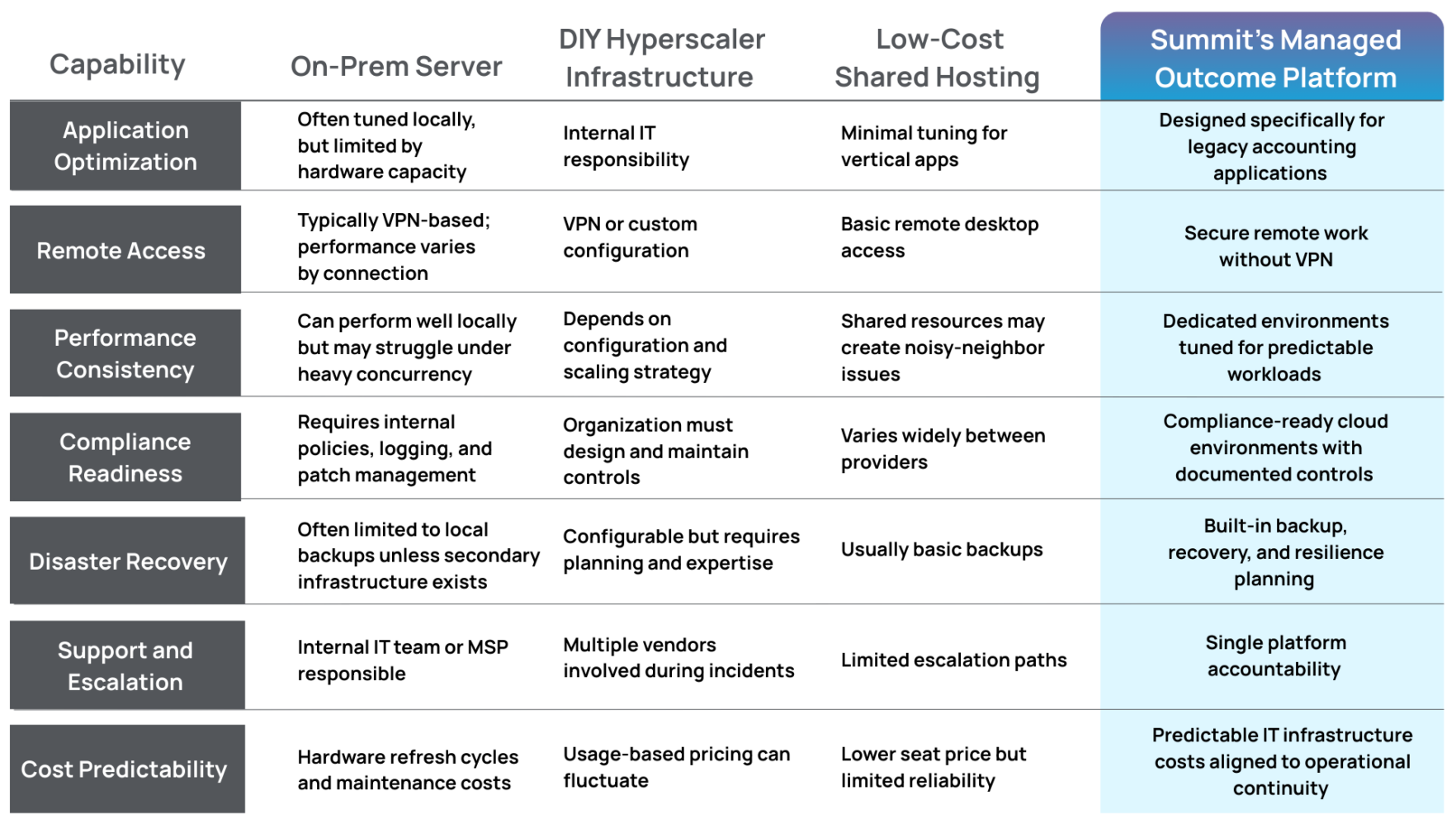
Each model offers advantages depending on an organization’s technical resources and risk tolerance.
Firms operating in compliance-heavy industries often prioritize stability and accountability over raw infrastructure flexibility.
Why Do Accounting Firms Often Choose Hosted Application Environments?
Many organizations ultimately arrive at a hybrid approach.
Instead of replacing their core software immediately, they modernize the infrastructure that supports it.
This approach allows firms to:
- Keep familiar applications that staff already know
- Support remote work securely
- Centralize security and access control
- Improve performance during busy seasons
It also reduces the need for local servers inside the office.
The result is an environment where legacy applications continue running—but within infrastructure designed for modern operational realities.
Executive Takeaway: Legacy Software Is Not the Problem
In many cases, legacy tax software continues to perform exactly as intended.
The challenge lies in the infrastructure supporting it.
When applications designed for local networks are forced into poorly configured environments, organizations experience:
- Slow performance
- Unreliable remote access
- Security gaps
- Operational friction during peak workloads
Modernizing the infrastructure layer allows firms to preserve the tools that work while improving reliability, security, and scalability.
For accounting organizations navigating tax season pressure, distributed teams, and rising compliance expectations, that balance often proves more practical than replacing their core software overnight.
The accounting industry may eventually transition toward more cloud-native platforms.
Until then, legacy tax systems will continue to play a central role—and the environments supporting them will determine how effectively firms operate around them.
Summit Team
We're the Summit team – cloud geeks, tech tinkerers, and security sleuths on a mission to keep your business running smoothly in and out of the cloud.