VPN access was never an infrastructure strategy. For a growing number of SMBs, it's become the gap between business continuity and a very expensive problem.
Here's a familiar scenario: an employee working remotely connects to the company VPN, opens your line-of-business software, and gets to work. From a productivity standpoint, it functions. From a security and operational standpoint, it leaves a lot unaddressed.
This isn't unique to any one industry. Professional services firms, healthcare administrators, financial advisors, distributors, and field-service businesses all run into the same wall. The tools people use to get work done are critical — and the infrastructure underneath them often isn't built to match.
VPN access was designed to encrypt a connection between a remote device and an office network. It was not designed to govern what happens at either end of that connection, protect sensitive data from being copied locally, or give you any documentation if something goes wrong.
What Does a VPN Actually Do — and Not Do?
A VPN creates an encrypted tunnel between a device and your network. Traffic in transit is protected. That's the extent of it.
What a VPN does not address:
- The security posture of the device on the other end — personal laptops, shared home computers, unmanaged endpoints
- Whether files are being downloaded and stored locally outside your control
- Who accessed what data and when — the kind of documentation auditors and insurers ask for
- Patching, monitoring, or segmentation of the servers or environment being accessed
- What happens when something breaks and there's no clear owner of the infrastructure
For a solo operator or a two-person team, these gaps are manageable. For a business with 10, 25, or 50 distributed employees running real applications — accounting software, ERP, CRM, practice management tools — these gaps compound quickly.
Why This Is a Business Risk, Not Just an IT Problem
The conversation about remote infrastructure tends to get filtered through IT jargon. But the actual risk is operational and financial.
Consider what's at stake when the remote environment isn't controlled:
- Downtime during critical periods. If your line-of-business software goes down during a busy period — tax season, a major sales cycle, a product launch — there is no VPN fix for a server that's offline or misconfigured. Someone has to own that problem. In a DIY setup, that someone is usually you.
- Data sitting on unmanaged devices. When employees download files to work locally, that data leaves your environment. If the device is lost, stolen, or infected, the data goes with it. In regulated industries this creates compliance exposure. In any industry it creates business risk.
- No audit trail. When an insurer, a client, or a regulator asks who accessed what and when, connection logs from a VPN are not sufficient. Session-level activity records, access controls by role, and documented offboarding procedures are what they're looking for.
- Vendor confusion during incidents. When something breaks in a VPN-dependent setup, accountability is fragmented. Is it the ISP? The firewall? The server? The software vendor? Every minute spent figuring that out is a minute of downtime.
Real-World Examples
Tax and accounting firms: Remote preparers accessing QuickBooks or Lacerte over VPN, downloading client files locally to "work faster," with no session logging and no clean offboarding when seasonal staff leave.
Healthcare admin teams: Distributed billing staff connecting to practice management software through VPN, with no MFA enforcement and shared login credentials that haven't been rotated in two years.
Legal and financial services: Remote professionals accessing case or portfolio management tools from personal devices, with no endpoint policy and no documentation that would satisfy a cyber insurance renewal.
Distribution and field operations: Office staff using VPN to access ERP or inventory systems from home, on hardware that has never been assessed or managed by anyone.
What a Controlled Remote Environment Actually Looks Like
The businesses that handle this well aren't necessarily spending dramatically more. The difference is where the accountability sits and whether the infrastructure is built to match how people actually work.
In practice, a well-structured remote work environment means:
- Applications run in the cloud — not on local devices. Your line-of-business software runs inside a managed hosted environment. Employees access it through a browser or thin client. Nothing installs on the endpoint, and nothing lives there when the session ends.
- Data stays in the environment. Files don't travel to personal laptops. There's no local copy, no USB workaround, no "I'll finish this at home" scenario that takes data outside your control.
- Access is managed by role. A new hire gets access to what they need. A departing employee loses access in minutes. A contractor's session can be revoked without chasing down which files they may have retained.
- MFA is enforced at the infrastructure level. Not as a policy memo that gets ignored under pressure — as a technical control that cannot be bypassed.
- Activity is logged and available. When someone asks for evidence of access controls — an auditor, a client, a cyber insurer — you have it. Not VPN connection timestamps. Actual session-level records.
- There's a named escalation path. When something breaks at an inconvenient time, you know exactly who to call. And that party owns the resolution, not just the ticket.
None of this requires building out your own data center or hiring a full-time infrastructure team. It requires a platform that takes ownership of these outcomes — so your team can focus on the business.
How Do the Options Compare?
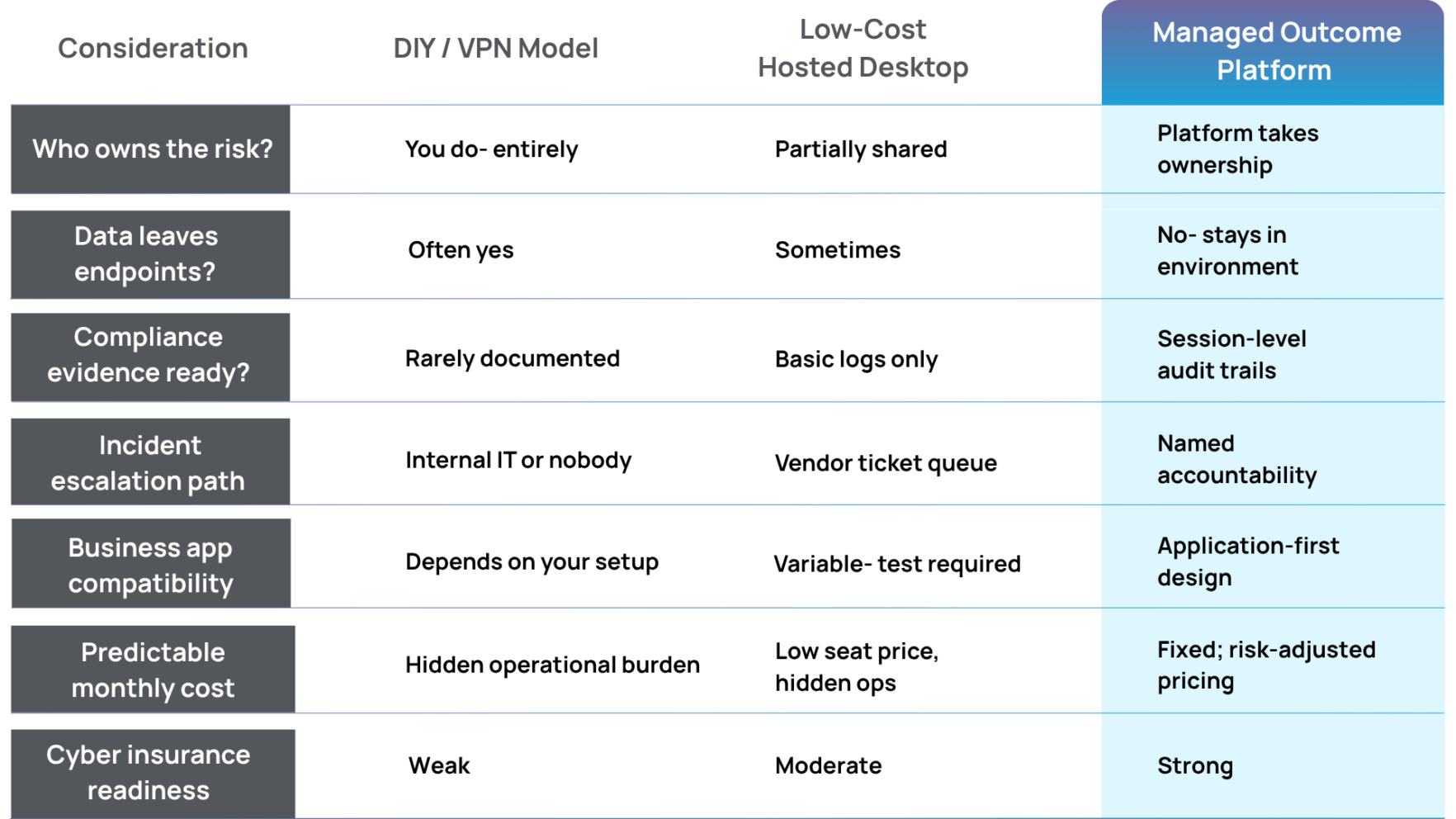
The seat-price comparison almost never holds up when something actually goes wrong. A low-cost hosted desktop with no real escalation path, no compliance documentation, and no application-specific support turns a small monthly saving into a significant incident cost.
What Should SMB Leaders Be Asking Right Now?
Whether you're evaluating your setup for the first time, being pushed by a cyber insurer, or going through due diligence for a PE-backed transaction, these are the questions that matter:
- Can we document — with logs — who accessed sensitive business data and when?
- If an employee leaves today, can we cut their access within ten minutes?
- Does our critical business software run in a dedicated, isolated environment, or on shared infrastructure with other companies' workloads?
- If the system goes down tonight, who owns that problem and what's the response time?
- Would our current setup satisfy a cyber insurance underwriter's questions about access controls, endpoint management, and data handling?
If any of those answers are uncertain, you're not in a unique position. Most SMBs built their remote infrastructure reactively — adding solutions to immediate problems without a framework underneath. The result is a patchwork that works until it doesn't.
The businesses that come through audits, insurance renewals, and staff transitions in good shape are the ones that made a deliberate decision about infrastructure accountability. Not necessarily the most expensive choice — the most deliberate one.
The Summit Position
Summit is built for SMBs that run real line-of-business software and need it to perform reliably in a compliant, access-controlled environment.
We don't sell generic hosted desktops. We own the outcome: application performance, security posture, compliance controls, and a clear escalation path when something goes wrong.
That's not a feature list. It's accountability.
The Bottom Line
VPN access is not a remote work strategy. It's a connection tool — and for a growing number of SMBs, relying on it as the primary infrastructure layer means absorbing risks that are both avoidable and increasingly visible to the people evaluating your business.
Regulators have caught up. Cyber insurers have caught up. And the businesses that get caught in the middle are usually the ones that treated IT as a cost to minimize rather than a risk to manage.
The infrastructure decision isn't about finding the lowest seat price. It's about deciding who owns the outcome when something goes wrong. That answer should be clear before you need it.
Talk to Someone at Summit
In 30 minutes, we can walk through your current remote setup, identify the gaps, and show you what a managed outcome environment looks like for a business like yours — no jargon, no hard sell.
Schedule a conversationFree Resource: Remote Work Infrastructure Checklist for SMBs
A practical one-page checklist covering access control requirements, endpoint risk factors, compliance documentation gaps, and the five questions your cyber insurer is likely to ask. Written for business owners and operators, not IT departments.
Download the free checklistSummit Team
We're the Summit team – cloud geeks, tech tinkerers, and security sleuths on a mission to keep your business running smoothly in and out of the cloud.